Motor control via web server – how does that work?
By Adriana Glazer (Edited by Shizu Yamaguchi)
Stop Fighting with Software: Commissioning Motors Faster with the dryve D1
In the world of industrial automation, we’ve all been there: you’ve got the hardware mounted, the wiring looks clean, and then you hit a wall. You spend hours hunting down the right version of a proprietary .exe file, navigating a specialized communication protocol, or—worst of all—begging your IT department for administrative rights just to install the configuration software.
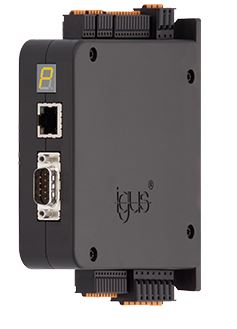
At igus, we’re focused on offering the simplest possible solutions for your motion challenges. That’s why we developed the dryve D1 control system. Whether you’re running stepper motors, DC motors, or EC/BLDC motors, the D1 is designed to get your system moving without the typical software headaches.
The Power of an Embedded Web Server
The “secret sauce” of the dryve D1 is its web-based architecture. However, let’s clarify what we mean by “web-based” for our engineering audience. To be clear: the dryve D1 itself is the web server.
When we talk about a web server in this context, we aren’t referring to a remote cloud server hosted somewhere on the World Wide Web. Instead, the D1 features an integrated, embedded web server that hosts the control software directly on its hardware. When you connect to the D1, you aren’t pulling data from the Internet; you are accessing the GUI and configuration tools stored locally on the motor controller’s own processor.
This is a significant advantage for commissioning. Because the “software” lives on the D1, you don’t need to install anything on your PC. Any conventional computer with a current HTML5-capable web browser becomes your interface. This local-host approach ensures that you aren’t reliant on external connectivity—in fact, we recommend not having an internet connection during the first setup to exclude any external disturbances.
Hardware Setup: Plug, Play, and Move
The physical connection is as straightforward as it gets. You don’t need expensive, specialized connection cables or crossover cables.
- Physical Link: Use a standard Ethernet cable (RJ45 on both sides) to connect the D1 directly to your PC or through a switch.
- IP Connectivity: The IP address is assigned dynamically to adapt to your computer. Simply read out the IP address, enter it into your browser, and you’re in.
- Flexibility: Because it uses standard networking protocols, you can even connect via a WLAN router to commission or troubleshoot using mobile devices.
Why This Matters for Your Timeline
By moving the configuration interface to an embedded web server, we’ve eliminated the friction points that stall projects. You can utilize standard browser features—like zooming, generating PDFs of your parameters, or downloading/uploading configurations—to streamline your workflow.
The dryve D1 is designed to work as well with your existing motors as it does with igus motors, providing a universal, IT-friendly solution that gets your “Low Cost Automation” projects off the ground faster. No more waiting for IT approvals, and no more bloated software installs. Just a cable, a browser, and motion.
To see our extensive video collection on our web-based motor control technology, please visit our dedicated page at https://www.igus.eu/motor-control/assistance.
If you have any additional questions, reach out to our Canadian team at 1-800-965-2496 or www.igus.ca to chat live with a technical representative.