Programming robots myself – how do I get started?
By Adriana Glazer (Rewritten by Shizu Yamaguchi)
Many engineers wonder if it is possible to program a robot without specialized expertise. In this blog post, we will aim to assist the DIYer by covering several topics, including using basic commands and intuitive software. We will begin with the subject of offline programming.
The Advantages of Offline Programming
Before you interface with the physical hardware, you can define robot movement sequences using offline programming. This procedure allows you to simulate motion profiles in a 3D user interface without being connected to the actual robot. Once the logic is established, you can use the control system to transfer the program to the physical unit. This approach allows you to develop and test automation sequences without interrupting your current production or processes. (Note that calibration and validation may still be required after the transfer). Movements programmed in the simulation can be implemented on the shop floor after real-world validation, safety checks, and tuning.
Technical Prerequisites: Commands and Kinematics
To begin programming, you will typically require a computer running on Windows. While the software is intuitive, having a foundational understanding of programming logic and common robot commands is beneficial. If you are new to this field, we recommend familiarizing yourself with basic programming through our technical support team or our instructional YouTube channel.
It is also essential for you, the programmer, to be comfortable with the X, Y, and Z Cartesian coordinate system. Understanding these coordinates ensures you can predict how the robot kinematics will move in physical space. This foundational knowledge helps prevent program errors and avoids costly equipment collisions.
Your First Steps in Robot Programming
Once you understand the coordinate systems, you can begin building your application. The teach-in function simplifies the process by allowing you to program even without a live robot connection. In this process, you, the user, manually define the desired positions and determines the specific path the robot should take to reach them. By repeating this process, you create a complete motion profile that can be saved and loaded for future use.
The finished program is then transferred to the physical robot via an Ethernet. After the robot is commissioned and homed, it can execute the offline (likely after safety validation and dry runs).
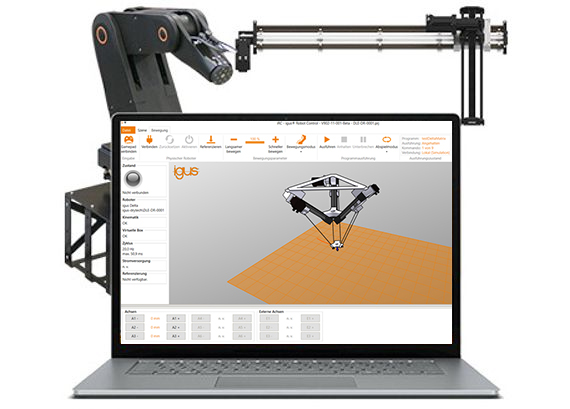
Streamlining Automation with igus Robot Control
The igus Robot Control software provides a comprehensive package for engineers looking to manage their own programming. This control system is designed for both beginners and experienced integrators.
It is compatible with a wide range of hardware, including articulated arm robots, delta robots, and Cartesian systems. The software features an intuitive interface with standard commands for individual axis movement and coordinated linear paths. Beyond simple motion, the software supports advanced logic such as if-then-else statements, loops, and digital I/O integration. The implementation process is further simplified by pre-configured support for various grippers and vision.
Testing Your Kinematics with Free Software
To help users determine which robot best fits their needs before making a purchase, we offer the igus Robot Control software as a free simulation tool. This software is simple, intuitive, available online at no cost and does not require a license to operate.
If you have questions about integrating these tools into your facility, please reach out to our technical sales team.
We also offer …
A broader range of igus technologies support reliable and efficient movement in machinery. In addition to our iglide® plastic bearings, we offer drylin® linear guides for smooth, lubrication‑free sliding motion, our robust e‑chain® cable carriers for managing dynamic cables, and our chainflex® cables engineered for long service life in motion applications. Together, these solutions create a complete, maintenance‑free motion ecosystem for modern machine design.